Universal Smart Search
Key Launcher features a dedicated Smart Search Bar powered by a full-screen Search Overlay. Unlike the home screen T9 keyboard which is optimized for quick dialing and filtering, the Smart Search Bar is designed for complex keyboard inputs, system configuration queries, files, and external fallbacks using your device's standard QWERTY virtual keyboard.
Triggering the Smart Search Bar
You can summon the Smart Search Overlay instantly using these methods:
- Swipe Down Gesture: Swipe downwards anywhere on the home screen (if the swipe-down gesture is set to open search in settings).
- All Apps Screen Search Button: Swipe up to open the app drawer and tap the Search () icon in the top-right corner.
- Voice Search: Tap the Microphone () icon inside the search bar to trigger Android's native speech-to-text recognizer.
Multi-source Search Capabilities
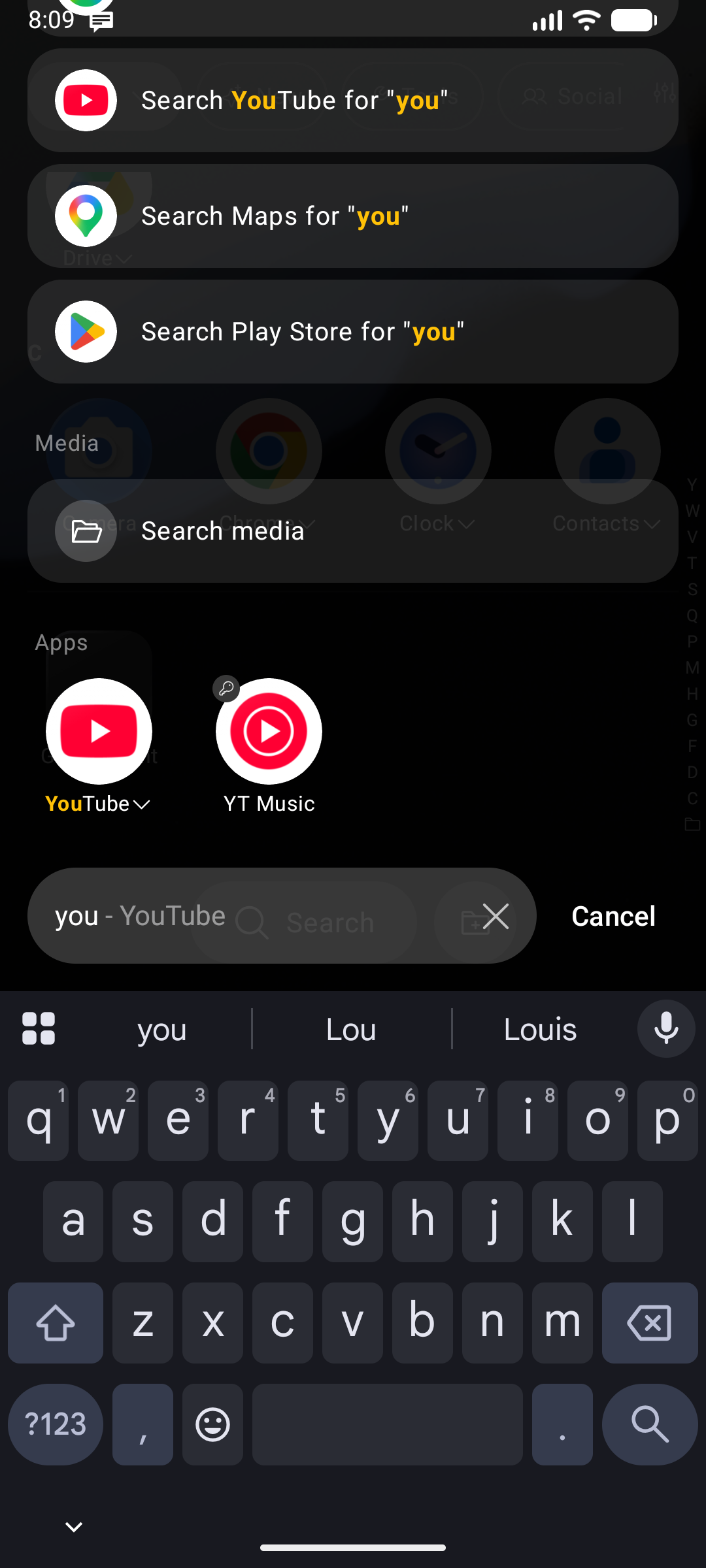
When you type a query into the Smart Search Bar, Key Launcher dynamically searches across multiple local and system indexes simultaneously. Results are grouped under clear section headers — Apps, Shortcuts, Folders, then settings, files, contacts, and the Web / Play Store fallbacks — so you can scan straight to the type of result you need:
1. Apps, Shortcuts & Folders
- Searches through your installed applications (by app label or package name).
- Finds matching Android system shortcuts (e.g., specific WhatsApp chat shortcuts, browser bookmarks).
- Filters and locates app folders by folder title.
2. Built-in Calculator
Type mathematical expressions directly into the search bar (e.g., (12+8)*5/2):
- Supports standard operators:
+,-,*,/,%(modulo),^(power), and parentheses( ). - An overlay card displays the computed result in real-time.
- Tap the result card to instantly copy the output to your device clipboard.
Prefer a real keypad? Enable Calculator Mode and long-press
*on the home screen to turn the T9 keyboard into a full calculator.
3. Settings Search
Quickly find settings screens without digging through menu trees:
- System Settings: Type keywords like
wifi,bluetooth,battery,display, orappsto trigger deep-link action cards that launch Android system pages directly. - Launcher Settings: Search for Key Launcher custom preferences (e.g., searching "haptic", "theme", or "lunar" to jump directly into the launcher's configurations).
4. Scoped File Search
Find local files by typing a portion of their name:
- Queries the Android MediaStore database for images, videos, audio tracks, and document files.
- Privacy & Compliance: Key Launcher does not request storage permissions on startup. Media permissions are requested lazily only when you perform a file search for the first time.
- Tapping a file result opens it in your device's default viewer.
5. Contacts Search
Find and act on contacts directly from the search bar:
- Type names or phone numbers to retrieve matching contacts in real-time.
- Similar to files,
READ_CONTACTSpermission is requested lazily only when you query contacts.
6. Open URL
When what you typed reads as a web address (github.com, https://…), an Open [address] row is pinned above every other section, and pressing Enter navigates straight there instead of running a web search.
When nothing matches on the home screen
You do not have to open the overlay to get these answers. If you type on the home keyboard and nothing matches, the app grid is replaced by a compact version of Smart Search built around what you typed:
- your query, shown large (trimmed from the start if it is long, so the characters you just typed stay visible),
- a calculator card if it is an expression,
- your search history, if enabled — tapping an entry replaces the query rather than opening a browser, so a typo is one tap from being fixed,
- Open URL when the text reads like an address,
- matching launcher settings and system settings,
- Google and Play Store suggestions,
- and an Internet section: web search · YouTube · Maps · Play Store.
Everything obeys the same source toggles as the overlay, the list scrolls, and Enter runs the first row. Phone-number queries keep their existing behaviour — call, SMS, add contact, and the messaging-app rows.
Search Settings
Tap the Search settings button at the bottom of the overlay — it is available both in the empty state and under the results list — to open a full-screen settings page for the search overlay itself.
Result types
Switch off any source you don't want cluttering your results. App, shortcut, and folder tiles are core and always shown; everything else is optional:
| Source | Covers |
|---|---|
| Calculator | The inline calculator result card |
| Contacts | Address-book matches |
| Internet | The Google / YouTube / Maps / Play Store action rows |
| Launcher settings | Key Launcher's own settings screens |
| System settings | Android system settings screens |
| Media | Images, video, and audio from MediaStore |
| Search history | The recent-searches strip and matching suggestions. Turning it off also stops recording new searches |
| Open URL | The "Open [address]" row and Enter-to-navigate behavior |
Search engine
Choose which engine the Search the web row uses:
Google (default) · Bing · DuckDuckGo · Brave · Ecosia
The action row shows the engine's own app icon when that app is installed, and its label updates to match — for example Search DuckDuckGo for "pizza".
Changes are staged as you tap and only committed when you press Apply; backing out discards them.
Result Ordering
Result groups are ordered by how well their best item matches your query, so the strongest source floats to the top instead of sitting in a fixed position. Three things are pinned regardless:
- Open URL — first, whenever the query is a web address.
- Calculator — directly under it, whenever the query is a valid expression.
- Internet actions — always last.
Empty Search State (History & Recents)
When you open the Smart Search Overlay and the search bar is empty, it acts as a quick-access dashboard:
- Search History: Displays a horizontal list of your recent search terms. Tap any term to re-search it, or tap Clear to wipe your history.
- Recent Apps: Shows a grid of your most recently opened or newly installed apps for instant relaunching.
Internet Actions
An Internet section is appended at the bottom of the results, so you can always escalate a query outward without retyping it. Each row shows the target app's real icon:
| Row | Opens |
|---|---|
| Search [engine] for "query" | Your chosen search engine in the browser |
| Search YouTube for "query" | YouTube search results |
| Search Maps for "query" | Google Maps search results |
| Search Play Store for "query" | The Play Store with your query pre-filled |
Turn the whole section off under Search settings → Result types → Internet.