Minimalist & Focused Philosophy
Key Launcher is built around a simple diagnosis: Digital Obesity. The average person installs 50–100 apps but actively uses only 5–8 every day. Yet traditional launchers force you to scroll through walls of icons every time you want to do anything — turning a tool into a distraction machine.
Key Launcher's answer is not a prettier icon grid. It's a fundamentally different interaction model.
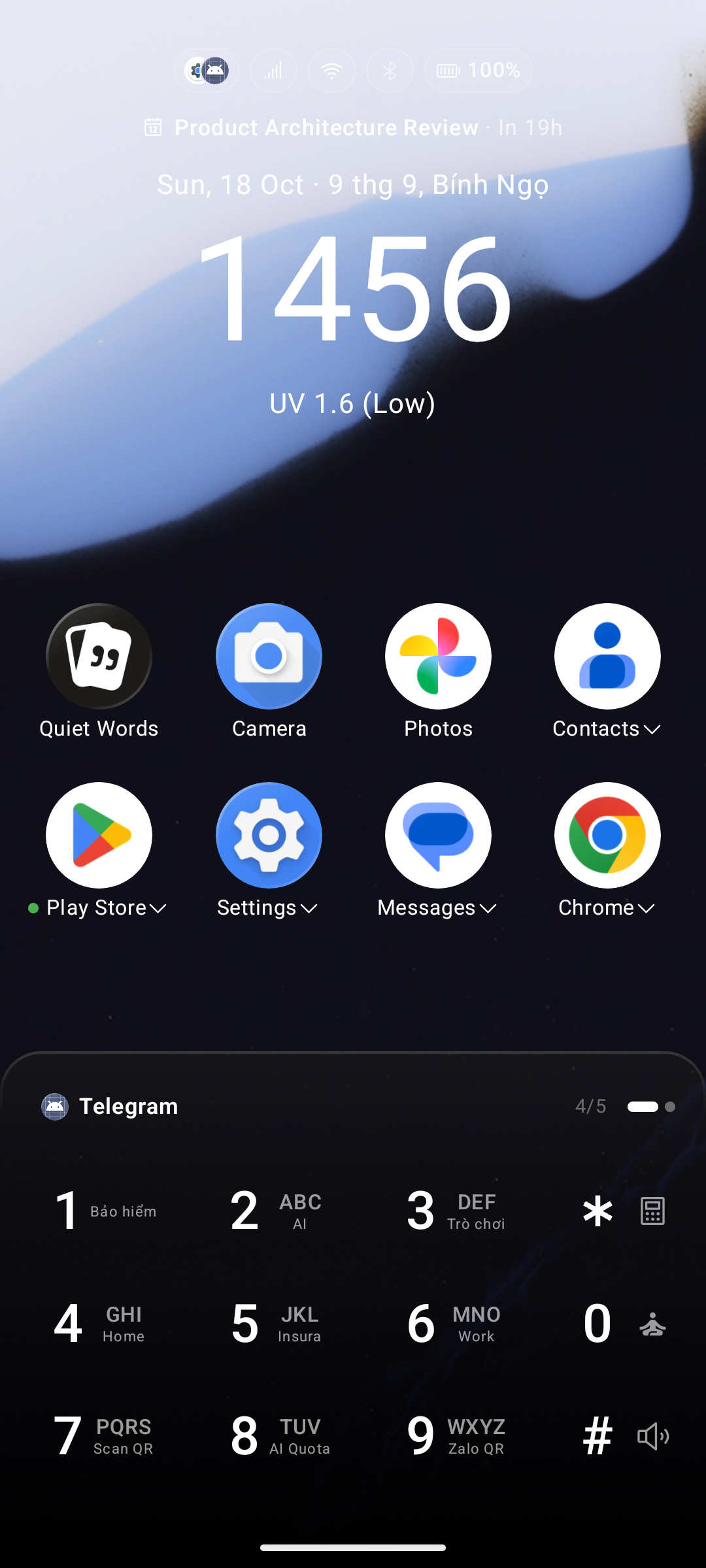
The Problem with Icon-Grid Launchers
Every time you pick up your phone with a specific intent — "I want to check the weather" — a traditional launcher forces your eyes to hunt across a sea of colorful icons arranged across multiple home screens. That visual scan is not neutral. Research in cognitive psychology calls it the Paradox of Choice: the more options you see simultaneously, the more cognitive load you carry, and the more likely you are to get sidetracked.
Vivid app icons are designed to trigger micro-dopamine responses before you even open them. Notification badges pull your attention to apps you didn't intend to open. The net result is what the article calls "zombie sessions" — picking up your phone for one reason and spending 20 minutes somewhere else entirely.
The T9 Search Paradigm: Search, Don't Browse
Key Launcher replaces browsing with searching — the same shift that already transformed desktop computing (Spotlight on Mac, the Windows key on PC). When you need an app, you type its name on the 9-key T9 keyboard. You don't see a grid of icons competing for your attention. You see only what you asked for.
This matters for two reasons:
- Intent-first access. Typing an app name is a deliberate act. The short "T9 friction" of 2–4 keystrokes prevents the habitual, unconscious app-opening that kills focus.
- Muscle memory over visual scanning. The nine large keys positioned in the natural thumb zone at the bottom of the screen follow Fitts's Law — the larger and closer a target, the faster you can hit it. Within a few days of use, common searches become physical reflexes. Opening your camera or messaging a contact stops being a conscious visual task and becomes as automatic as unlocking a door.
Key Design Principles
1. Friction-Based Access
The home screen displays only your small set of pinned apps and the T9 keyboard. Every other app requires you to type for it. That deliberate 2-second action is the entire point — it is the "healthy friction" that stops you from opening apps out of boredom or habit.
2. Search Doubles as Action
T9 search in Key Launcher is not just for finding apps. Searching a contact's name lets you call or message them directly from the result — zero extra taps. Functional shorthand codes (like a 3-digit alias for "weather") reduce Time to Intent to the minimum physically possible.
3. Clean Home Screen, Intentional Panels
The main workspace is quiet. Notification dots are absent. Swiping left or right across the keyboard reveals specific panels — Widget Center, Notification Center, Discover Feed — but only when you initiate that swipe. Information appears when you want it, not when an app decides to interrupt you.
4. Super Shortcuts for Zero-Thought Actions
Long-pressing any T9 key (2–9) activates a programmable Super Shortcut: open the camera, launch a payment QR, call a specific contact, toggle the flashlight. These aren't shortcuts to apps — they're shortcuts to outcomes, making your most repeated actions instant muscle-memory reflexes.
5. Focus Mode as a Hard Boundary
Long-pressing 0 activates Super Focus, which strips the screen down to a clock, date, and music controls, and blocks the keyboard and app drawer entirely. It is not a gentle nudge — it is a hard boundary you deliberately set for yourself.
What This Looks Like in Practice
Users who switch to Key Launcher typically report:
- Significantly fewer "zombie sessions" — picking up the phone and losing track of why.
- A meaningful reduction in daily screen time, driven by intent-only app access.
- Faster task completion for frequent actions once muscle memory kicks in, usually within the first week.
- A phone that feels like a high-performance tool again, not an entertainment vending machine.