Search Settings
The Search Settings screen tunes how the home screen T9 keyboard finds and launches results. Open it from Settings → General → System / Behavior → Search Settings or via Settings → Search.
The full-screen Universal Search overlay has its own separate settings page — result types and web search engine — reachable from the Search settings button inside the overlay. See Universal Search → Search Settings.
Ergonomic Results Alignment (Four Corners)
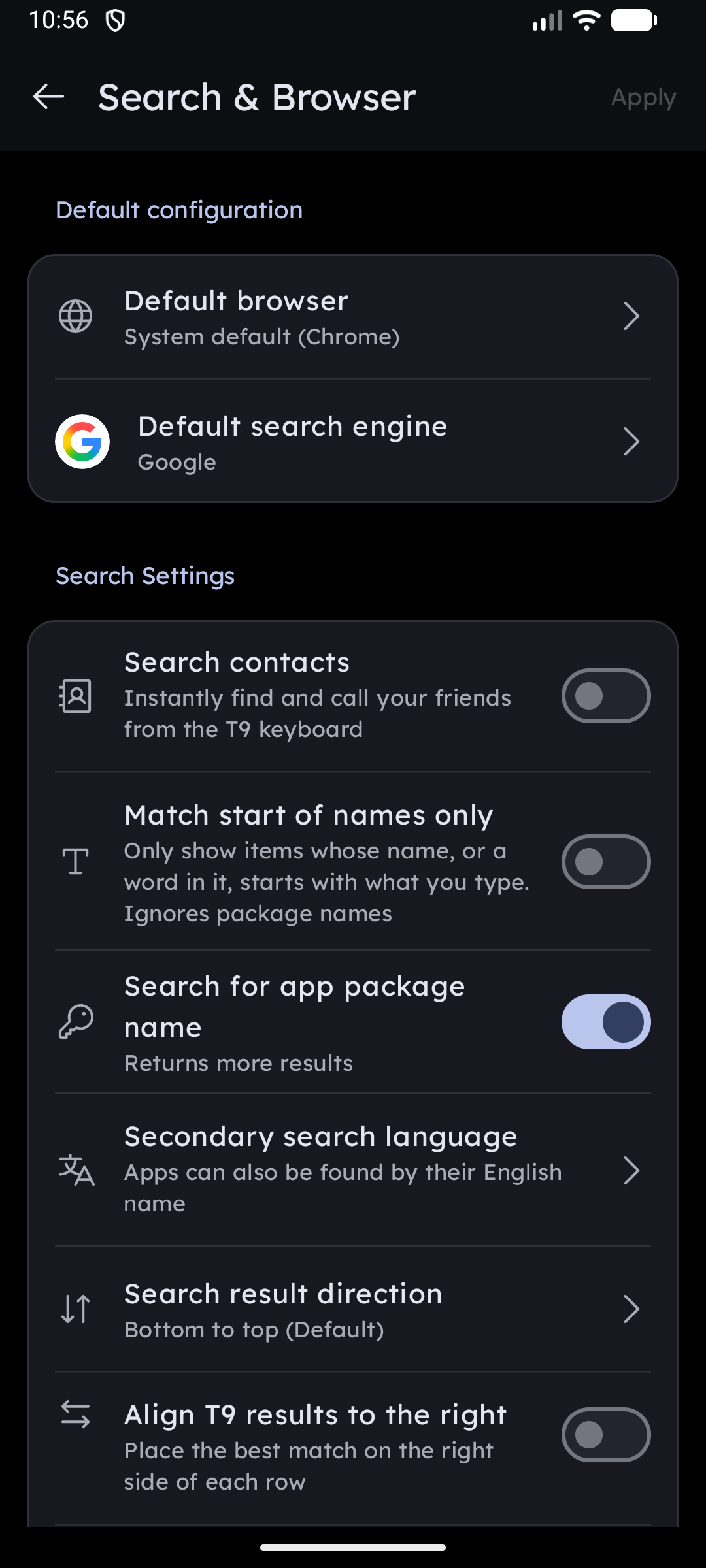
Key Launcher allows you to tailor search result positioning perfectly for one-handed operation:
- Align T9 results to the right: Shifts result chips to hug the right edge of the screen, ideal for right-handed use.
- Search result direction: Choose whether results flow from top-to-bottom or from bottom-to-top (closer to your thumb).
- Four-Corner Flexibility: By combining horizontal alignment (Left vs Right) and vertical flow (Top vs Bottom), you can place your best matching search result in any of the four corners of your screen, matching your natural grip.
Search Action Key Behavior
The search action key (located beside the search query bar on the keyboard) can be customized:
- Bookmark (Default): Tapping saves the current query or search keyword as a quick hotkey.
- Phone Dialer: Tapping the button immediately initiates a phone call to the typed number (or opens the dialer if the query is blank). Long-pressing the key retains access to the Bookmark action, giving you convenient two-way access.
Contacts & Result Sources
- Search Contacts: Toggle whether typing on the home keyboard matches people in your address book. Enabling it requests
READ_CONTACTSaccess in-context.- Search by Phone Number: When contact search is on, also match against contacts' phone-number digits (not just their names).
- Search by Package Name: Match the technical package/app-id of installed apps, returning more results for power users.
Secondary search language
Your phone may show app names in a script you would rather not type. Secondary search language makes each app findable by its name in a second language as well, so you can reach it from the Latin keypad — or reach a Latin-named app by its native name.
- Off — apps are only found by the name shown on screen.
- Pick any of the 31 supported languages (each listed under its own native name) and the launcher reads every app's label a second time in that language and indexes both.
Typical use: a phone set to Urdu, Arabic, Russian or Vietnamese shows فون / Điện thoại, while setting the secondary language to English also makes it answer to phone.
- Results found this way rank below matches on the visible name and are badged with a small icon.
- Apps that ship no translation for the chosen language simply keep one name — nothing is lost.
- The same setting decides which alphabet is printed on the keypad when Show Alternative Characters is on, and whether an all-kanji Japanese name is romanised as Japanese.
Changing it re-indexes your app list right away — no restart needed.
Deep-Search Inside Messaging Apps
When supported messaging apps are installed, Key Launcher can surface in-app contact shortcuts directly from the T9 keyboard so you can jump straight into a chat:
- Zalo
- Viber
Each app has its own toggle and only appears when that app is installed on your device.
Auto Launch & Quick Open
Control how aggressively the launcher opens the first result so you can open apps without lifting your thumb:
- Auto Launch Mode:
- Quick Open only (default): Never auto-opens. Instead it shows a "Open [App]" chip on the keyboard when the result count is small.
- By Result Count: Automatically opens the first item once only a few results remain. Configure the results threshold.
- By Digits Pressed: Automatically opens the first item after you press a set number of keys. Configure the digits threshold.
- Quick-Open Chip Threshold: Sets how few results must remain (N or fewer) before the "Open [App]" chip appears.
Result Filters
The filter control on the T9 keyboard narrows results to a single type: All, Apps, Contacts, Shortcuts, Folders, or Quick Action.