Quick Actions
Quick Actions are the shortcuts an app publishes for itself — "New message" in Gmail, "New tab" in Chrome, a pinned chat in a messenger. Key Launcher surfaces them next to the app, and lets you promote the ones you use often into standalone items you can search for.
Android only exposes app shortcuts to the default launcher. If Key Launcher is not set as your home app, Quick Actions stay empty — see Initial Setup.
Opening the Quick Action Menu
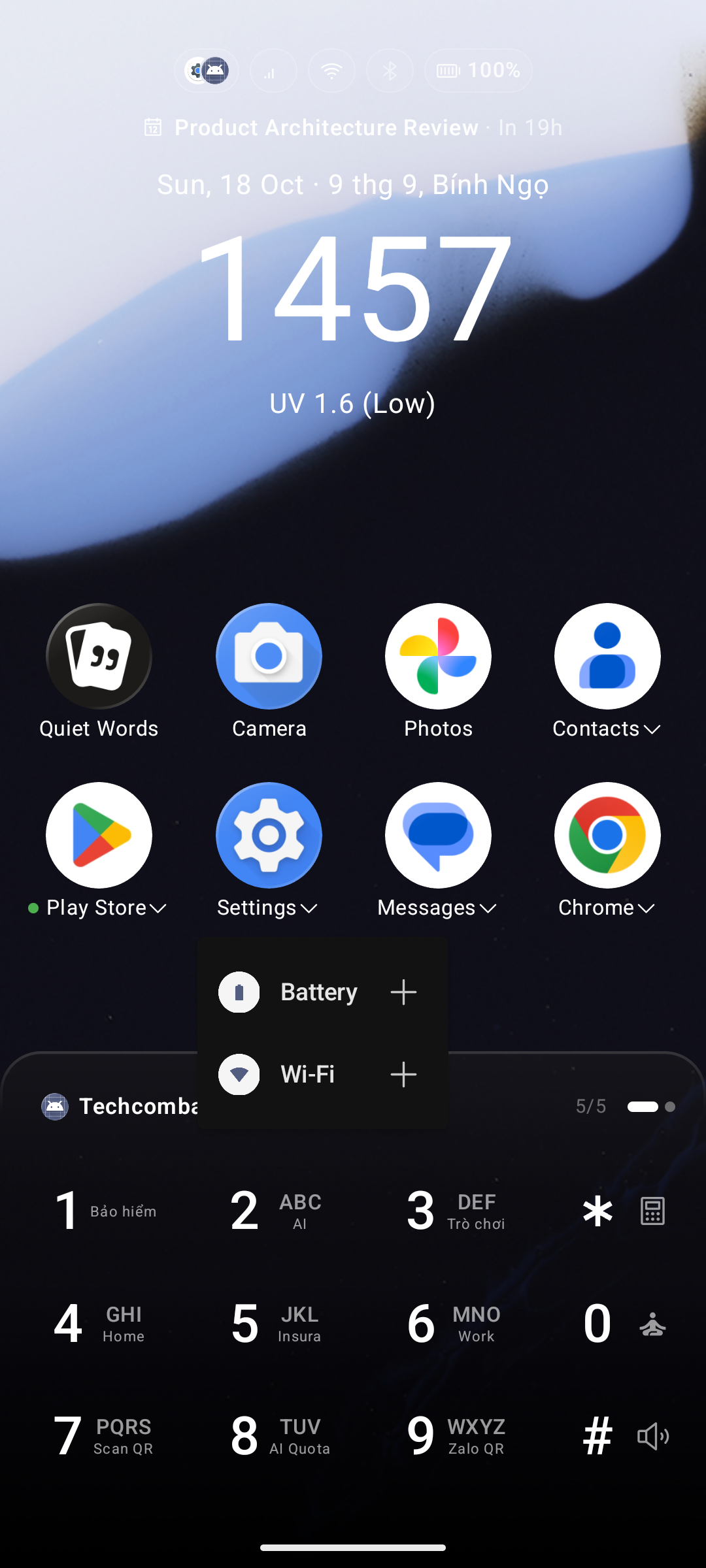
When Show Quick Action is enabled (Settings → Icons Grid → Details), any app that publishes shortcuts shows a small ▾ arrow next to its label. Tap the arrow to open the Quick Action menu.
The arrow appears everywhere apps are listed:
- The home screen pinned grid
- The App Drawer (grid and list mode)
- The T9 result list and the Smart Search overlay
- Inside an open folder
Tap any row in the menu to run that action immediately.
When you set Key Launcher as your default launcher while Quick Actions are switched off, the launcher offers to turn them on with a "Turn on Quick Action?" prompt. Choose Later to dismiss it.
Adding a Quick Action to Your App List
Each row in the Quick Action menu has a + button on the right.
- Tap + — the action is added to your app list and the button turns into a ✓.
- The menu stays open, so you can add several actions in one go.
An added Quick Action behaves like any other item: it shows up in the App Drawer, in Smart Search, and in T9 search results, and can be renamed, hidden, moved into a folder, or moved to the Private Vault from its long-press menu.
To put one on the home screen, long-press it and choose Pin to Home — the + button only adds it to the app list, it never pins on its own.
To remove it: long-press the item and choose Remove from app list.
Contact Quick Actions
The Quick Actions menu of a contact (tap the contact name with the ▾ arrow) carries the same + button on every phone-number row.
Adding one creates a standalone item such as Call Mom or Message Alex that lives in your app list and answers to T9 search — a true one-tap speed dial, with no contact card in between.
Supported rows: Call, Message, Zalo, Viber, and WhatsApp.
Android caps how many shortcuts one app may publish (around 15). When you hit the ceiling, Key Launcher shows a "Quick Action limit reached" message — remove an existing contact Quick Action to free a slot.
Filtering Search Results
The filter control on the T9 keyboard includes a Quick Action filter alongside Apps, Contacts, Shortcuts, and Folders. Selecting it narrows results to Quick Action items only — handy once you have collected a few.
App shortcuts you pinned through Android's own system (for example from a browser's "Add to home screen") stay under the Shortcuts filter; the two lists never overlap.
Related
- Super Shortcuts — bind a Quick Action to a long-press on a number key.
- Contact Tap Action — change what a plain contact tap does.