Long-Press Actions (* 0 #)
The three special keys — *, 0, and # — each run an action when you long-press them. Which action sits on which key is up to you.
This assignment table is hidden while the QWERTY keyboard is selected:
*,0and#only live on its symbol layer, and the BlackBerry layout gives Calculator, Super Focus and the Ringer toggle their own keys. The long-press actions still fire on the symbol layer, so nothing becomes unreachable.
Open Settings → Keyboard → Long-press actions.
Assigning Actions
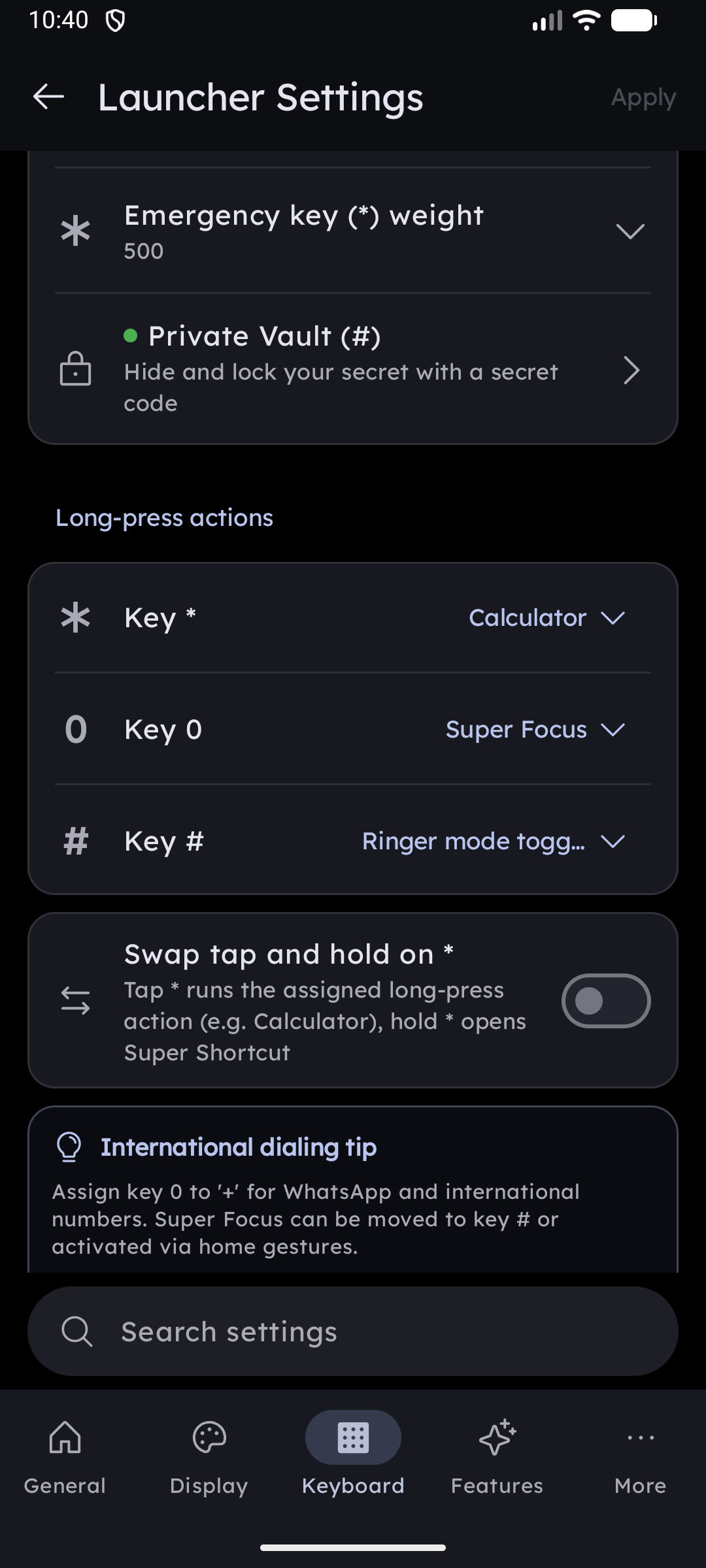
The section lists one row per key — **Key ***, Key 0, Key # — each with a dropdown:
| Action | What a long-press does |
|---|---|
| Calculator | Turns the T9 grid into a full calculator keypad |
| Super Focus | Opens Super Focus, the distraction-free desk mode |
| Ringer mode toggle | Cycles your phone between Ring, Vibrate, and Silent (see below) |
| None | Nothing happens on long-press |
Defaults: * → Calculator, 0 → Super Focus, # → Ringer mode toggle. These match how the keys behaved before the setting existed, so upgrading changes nothing.
One action, one key
An action can only live on one key at a time. Assign Calculator to 0 while it is already on *, and the two simply swap — * picks up whatever 0 was holding. This makes it impossible to end up with the same action on two keys, or to lose an action by accident.
The assignment decides which key calls a feature; whether the feature is available at all is still its own toggle right below (Calculator, Super Focus, Ringer mode toggle). Turning a feature off leaves its key doing nothing until you assign something else.
Key hints
The assigned action's icon is printed on the key face. The Ringer key is special: its icon reflects the mode your phone is currently in and updates the moment you switch.
Prefer a bare keypad? Hide Icons Under * 0 # in Size & Layout removes the hints while keeping every action working.
Ringer Mode Toggle
Long-press the assigned key to cycle your ringer, without unlocking the volume panel or reaching for the hardware keys.
Tap the row to expand it and choose which modes take part in the cycle:
| Mode | Notes |
|---|---|
| Ring | Normal ringer |
| Vibrate | Vibrate only |
| Silent | Requires Do Not Disturb access — the row shows a reminder until you grant it |
The row's subtitle previews your cycle, for example Ring → Vibrate → Silent.
- At least two modes must stay selected — with fewer there is nothing to cycle through, so unchecking the second-to-last one is refused with a message.
- Without Do Not Disturb access, choosing Silent prompts you to grant it in system settings. Grant it, come back, and the reminder clears itself.
Related Settings
The # key also opens the Private Vault when you type # followed by your passcode — that is a tap flow and is unaffected by whatever long-press action you assign here.